
1. PC Cooling and Maintenance in Summer
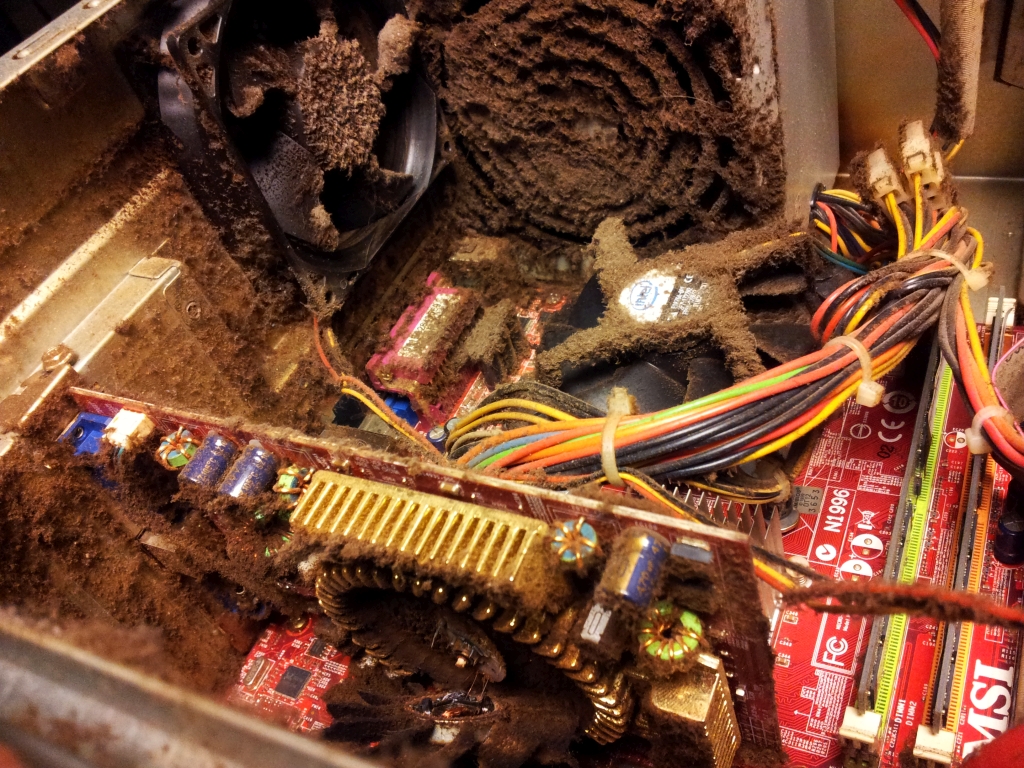
- A well-cooled PC should be able to maintain perfectly safe operating temperatures without any problems, even with the summer heat that has been hitting Europe for weeks. However, the situation can change if we don’t perform basic maintenance on the equipment and allow dirt and dust to accumulate in the cooling system.
- I know this is a topic many of you are familiar with, but I’m also aware that many people simply skip PC maintenance altogether, and others believe that because they have many fans and liquid cooling, “a little dust” won’t affect the computer’s performance or the cooling system’s capacity.
- Is this true, or will any well-cooled PC actually be affected by dirt and dust? To find out, I wanted to test it firsthand with a curious experiment: I let dust accumulate in my personal PC for almost a year, measured the temperatures, cleaned it, and then took another measurement to see if there was any difference.
2. My PC Specs
- AORUS MASTER X3D ICE X870E motherboard.
- Ryzen 7 7800X3D processor with 8 cores and 16 threads at 4.5 GHz-5 GHz (base and turbo modes). It has 8 MB of L2 cache and 96 MB of L3 cache.
- Corsair XTM70 thermal paste.
- Corsair Vengeance RGB 64 GB RAM kit in two 32 GB modules at 6000 MHz with CL30 latencies.
- Corsair iCUE H150i ELITE LCD XT all-in-one liquid cooling system with a 360 mm radiator and three 120 mm fans.
- AORUS GeForce RTX 5090 MASTER ICE graphics card.
- Sound BlasterX AE-5 Plus sound card.
- Corsair MP400 4 TB PCIe NVMe SSD. 2TB Corsair MP600 Core PCIe NVMe SSD.
- 2TB Corsair MP600 GS PCIe NVMe SSD.
- 2TB Samsung 980 Pro PCIe NVMe SSD.
- Corsair HX1500i 1500W 80 Plus Platinum certified power supply.
- Corsair iCUE 7000X RGB chassis in white.
- Three Corsair AF120 RGB Elite fans on the liquid cooling kit radiator.
- Three Corsair SP140 RGB Elite fans on the front.
- Four additional 120mm Corsair iCUE QL120 RGB fans on the side.
- One Corsair iCUE QL120 RGB fan on the rear.
- Windows 11 operating system.
- Corsair Commander Core XT and Commander Core for lighting and fan control.
- As you can see, this PC is very well cooled and has optimal airflow. It also has filters that prevent dust from entering, located on the front, side, top, and bottom of the chassis.

3. The Problem of Dirt, Dust, and Cooling in PCs
- When using a PC, several fans draw cool air inside. This is necessary to create good airflow, but it also creates a problem: dust and dirt are drawn into the system. To reduce this problem, most cases come with filters that almost completely block dust and dirt from entering.
- This creates another problem: dirt and dust will accumulate on the filters, and if they aren’t cleaned regularly, a layer of grime will build up, clogging the filter and reducing the amount of cool air entering the system. If the filters become clogged with dirt and dust, there will come a point where the airflow inside the PC will gradually decrease, eventually causing a serious problem with operating temperatures.
- That’s precisely what happened to my computer after a year of use without cleaning the filters. The front panel was quite dirty, with a thin layer of grime already affecting the air intake. On the side, where I have four fans pushing air in, the layer of dirt was thicker and affected the intake of cool air even more, and some of that dirt had adhered to the fans.
- My PC is in a room right next to the window, so it’s more exposed to dust and dirt, especially when the weather is nice and I have the window open, which forces me to clean it more frequently.
4. Test Results and Temperatures
- After almost a year without cleaning the front and side filters, and after accumulating a considerable layer of dust, the average temperature of the processor, a Ryzen 7 7800X3D, rose by 10 degrees C, and I even had a peak performance loss in multithreading in Cinebench R23, as it dropped below 17,000 points.
- The processor temperatures improved significantly after cleaning the filters, and this also had a very positive impact on the graphics card temperature, although less pronounced because it has a very large and powerful cooling system.
- Keep in mind that maximum values can vary depending on the game. For example, Cyberpunk 2077 is more processor-intensive than Dying Light: The Beast, and therefore I recorded peaks above 80°C and averages of 78°C in the former.
- The AORUS GeForce RTX 5090 MASTER ICE comes pre-overclocked and is designed to operate at the highest possible speed as long as it has thermal headroom. Therefore, it’s not unusual for it to occasionally reach or exceed 80°C. Anything below 90°C on an RTX 5090 is a safe temperature.
- The Ryzen 7 7800X3D, on the other hand, has a 3D-stacked L3 cache block on top of the CPU chiplet (CCD unit). This block acts as thermal insulation, complicating the processor’s cooling and resulting in high operating temperatures. Operating temperatures between 75 and 80 degrees Celsius with this processor are normal and shouldn’t cause concern. Its thermal limit is 89 degrees Celsius.
5. Conclusion
- The takeaway from this article is simple: keeping your PC clean matters a great deal. As we’ve seen, it affects the cooling system’s capacity and the performance of its components. It can also negatively impact PC stability and, in extreme situations, lead to irreparable damage from overheating.